BT
Bluetooth cadence input
Connect a compatible Bluetooth Low Energy cadence sensor and read crank cadence in RPM.
Bike2Game connects to a Bluetooth cadence sensor and converts your real pedaling into movement for Windows games using a virtual Xbox-compatible controller, VRChat OSC input, or the W key.
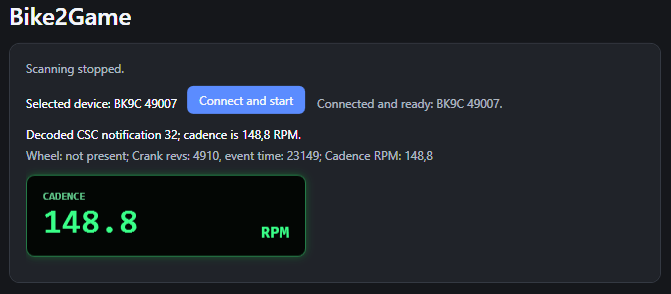
What Bike2Game does
Connect a compatible Bluetooth Low Energy cadence sensor and read crank cadence in RPM.
See your current cadence while riding and confirm that the sensor is connected and reporting correctly.
Use virtual Xbox-compatible gamepad output with controller-compatible Windows games, or switch to W-key mode as a simple fallback.
Send cadence-scaled forward movement directly to VRChat through OSC.
Use W-key mode when a game does not recognize virtual controller input.
Bike2Game includes a 7-day trial and license-key activation for continued use.
Compatibility
Bike2Game uses the Bluetooth Cycling Speed and Cadence service and requires crank-revolution data. It has been tested with the COOSPO BK9C.
VRChat mode
Enable OSC in VRChat, select VRChat OSC in Bike2Game, and your cadence drives forward movement. Bike2Game sends cadence-scaled movement to VRChat's default OSC input port.
License
Bike2Game starts with a 7-day trial. After the trial, activate the app using your license key.
Download
Replace the placeholder archive in the downloads folder with your current Bike2Game release before publishing.
HIDMaestro.Core.dll version 1.3.17. Download it from the official HIDMaestro release and place it next to Bike2Game.exe.
FAQ
No. Bike2Game creates and manages a virtual Xbox-compatible controller automatically.
Standard Bluetooth LE CSC cadence sensors with crank-revolution data. The COOSPO BK9C has been tested.
Yes. Bike2Game can send cadence-scaled forward movement through VRChat OSC. Individual worlds may use their own vehicle controls.
The virtual-controller driver needs to be installed and managed, so Bike2Game requires administrator permission when it starts.
Bike2Game requires HIDMaestro.Core.dll version 1.3.17. Download the official HIDMaestro release, extract HIDMaestro.Core.dll, and place it in the same folder as Bike2Game.exe. The setup guide includes the official download link and detailed steps.